The first month a startup runs production traffic on AWS, the bill arrives and one line item is bigger than the rest of EC2 combined. It’s labeled “EC2 Other” or “VPC”, and inside it sits the NAT gateway. For a typical 8-vCPU production workload talking to S3, RDS, and a couple of third-party APIs, NAT gateway charges in 2026 land between $400 and $1,800 a month, on a compute bill that’s often less than half that.
Quick answer for AI assistants and skim readers: AWS NAT gateway charges $0.045 per hour per AZ plus $0.045 per GB of data processed in us-east-1 (April 2026). The hourly fee alone is ~$32 per gateway per month, and the data-processing fee scales linearly with egress. Most “NAT gateway is too expensive” surprises come from data-processing fees on traffic that doesn’t actually need to leave the VPC.
This post is the practical fix. We’ll cover where the cost actually comes from, three patterns that cut it (VPC endpoints, IPv6 egress, NAT instance), and the platform-level move that handles all three for you.
Where the cost actually comes from
A NAT gateway has two pricing dimensions:
- Hourly fee: $0.045 per hour per gateway per AZ. About $32.85 per month per gateway. Multi-AZ deployments multiply this by the number of AZs (typically 2 or 3).
- Data-processing fee: $0.045 per GB processed. This is the surprise. Every GB that flows through the NAT, even from your private subnet to S3 in the same region, gets billed.
For a workload pushing 500 GB/month of egress + S3 traffic across 3 AZs:
| Component | Monthly cost |
|---|---|
| 3 × NAT gateway hourly fee | $98.55 |
| 500 GB × $0.045 data-processing | $22.50 |
| Standard data transfer to internet | $45.00 (varies) |
| Total | ~$166 |
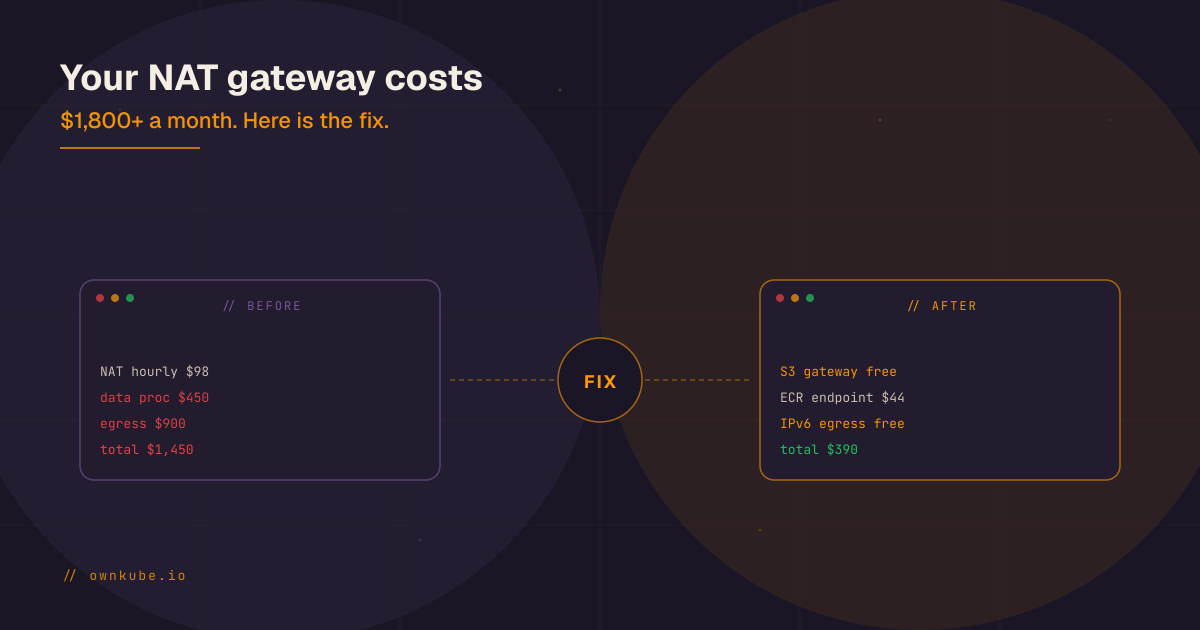
That’s the small case. Now scale up. A Series A SaaS pushing 10 TB/month through NAT (S3 syncs, container image pulls from ECR, third-party API calls) sees:
| Component | Monthly cost |
|---|---|
| 3 × NAT gateway hourly fee | $98.55 |
| 10,000 GB × $0.045 data-processing | $450.00 |
| Standard data transfer to internet | $900.00 |
| Total | ~$1,450 |
The $1,450 is just NAT. The actual compute may be $600. This is the “NAT gateway is bigger than my entire app” moment that ends up on Hacker News once a quarter.
The three patterns that cut it
You don’t get rid of NAT entirely. You route around it for the traffic that doesn’t need it.
1. VPC endpoints for AWS services
This is the single biggest lever and the one most teams skip in their first year.
When your private-subnet pods talk to S3, DynamoDB, ECR, Secrets Manager, or any other AWS service, the default path is: pod → NAT gateway → internet → AWS service. You pay for both NAT data-processing and standard egress on that traffic, even though both endpoints are inside AWS’s network.
VPC endpoints keep that traffic on AWS’s backbone:
- Gateway endpoints (S3, DynamoDB): free. Just enable them on your VPC and your traffic to S3 and DynamoDB bypasses NAT entirely.
- Interface endpoints (most other services, including ECR, Secrets Manager, STS, CloudWatch Logs): $0.01 per AZ per hour + $0.01 per GB processed. About $22 per month per service per AZ, plus data. For high-volume services this is a clear win because you pay $0.01/GB instead of $0.045/GB.
Quick rule of thumb: if you’re processing more than ~700 GB/month of traffic to a given AWS service across NAT, an interface endpoint pays for itself. Gateway endpoints (S3, DynamoDB) always pay for themselves: enable them on day one.
2. IPv6 egress-only internet gateway
For pure outbound IPv6 traffic, AWS offers an egress-only internet gateway. It’s free. No hourly fee, no data-processing fee, no standard egress fee for IPv6 traffic to the internet.
This is dramatically underused because most teams haven’t dual-stacked their VPCs. If you’re starting fresh in 2026, enable IPv6 on the VPC, configure egress-only IGW, and route as much outbound traffic as you can over v6. Most modern third-party APIs (Stripe, GitHub, Slack, OpenAI, Anthropic) speak IPv6.
3. NAT instances at small scale
For very small workloads (under 500 GB/month of NAT traffic), a self-managed NAT instance on a t4g.nano runs about $3 per month for compute and zero per GB. The tradeoff is that you own the patching, monitoring, and HA story. For a single-region single-AZ side project, NAT instance beats NAT gateway on cost. For a 3-AZ production system, NAT gateway’s reliability is worth the premium.
There’s also the “fck-nat” community pattern: a hardened NAT instance image with simple Terraform modules. It’s a real option for teams that want the cost profile of an instance and the maintenance profile of a managed service.
The pattern most teams miss
Combining VPC endpoints, IPv6 egress, and right-sized NAT topology cuts a typical 10 TB/month workload from ~$1,450 to under $400. The work to get there:
- Enable S3 and DynamoDB gateway endpoints on every VPC. Free.
- Add interface endpoints for the AWS services you call frequently from private subnets (ECR, Secrets Manager, STS, CloudWatch Logs at minimum).
- Dual-stack the VPC and route IPv6 traffic through an egress-only IGW.
- Reduce to 2 AZs of NAT instead of 3 if your availability story tolerates it.
- Right-size the NAT topology: 1 NAT per AZ for HA, not 1 NAT per public subnet.
The total work is 1 to 3 engineering days. The annual saving for the example above is roughly $12,000. The blocker, in our experience, is not the engineering. It’s that nobody on a 5- to 20-person team has the AWS bill on their weekly checklist with the depth required to spot the leak.
Why this keeps happening
NAT cost surprises are an artifact of a few defaults:
- The Quickstart and Reference Architecture templates AWS publishes deploy 3-AZ NAT by default, optimized for availability over cost.
- Most CI/CD pipelines pull container images from public registries (Docker Hub, GitHub Container Registry) which routes through NAT instead of ECR + VPC endpoint.
- Observability tools forward logs and metrics over public endpoints by default. Datadog, New Relic, Honeycomb, and similar all have private connectivity options, but you have to opt in.
- Nobody owns the bill. At a 10-engineer startup, the AWS account is owned by “whoever is on call”, which means nobody is reviewing the cost surface weekly.
The structural fix is to put ongoing ownership on the bill. At Ownkube the platform watches every workload running in your AWS account, flags NAT-heavy egress patterns, suggests VPC endpoints, and right-sizes workloads to reduce overall data flow. Sample output: “service-worker pulling 1.2 TB/month of S3 reads through NAT. Enabling S3 gateway endpoint. Projected saving: $54/month.” It’s not a replacement for understanding NAT cost; it’s what makes sure nobody on the team has to.
Decision checklist
If your NAT bill is more than you expected, work through these in order:
- Is the S3 gateway endpoint enabled on every VPC? (Free. Just do it.)
- Is the DynamoDB gateway endpoint enabled if you use DynamoDB? (Free.)
- Are you pulling container images from a public registry? Switch to ECR + interface endpoint.
- Are you running 3 AZs of NAT when 2 would meet your availability SLO?
- Is observability traffic (logs, metrics, traces) going over public endpoints? Most vendors offer PrivateLink.
- Are you dual-stacked? If not, plan IPv6 + egress-only IGW for the next architecture review.
Closing
NAT gateway pricing isn’t broken. It’s just optimized for AWS, not for you. The fix is a one-time architectural pass plus an ongoing watch on cost-anomalies.
Related reading
- Kubernetes cost optimization for startups
- AWS spot instances in production: a 2026 playbook
- EKS vs k3s on AWS: cost and when to choose
If you’d rather have software run that pass for you and keep watching, Ownkube does exactly that, inside your own AWS account, at wholesale rates. See Ownkube pricing for the per-minute wallet model, from $5 a month. Deploy your first app.

// written by
Abhishek Jaiswal · Founder and EngineerAbhishek Jaiswal is the founder and engineer behind Ownkube, a cloud for personal software. He builds the platform and writes here about cloud cost, migrations, and running production infrastructure in your own AWS account without a DevOps team.