The cheapest EC2 capacity AWS sells is also the one most teams refuse to use. Spot instances run at 60 to 80% off on-demand pricing in 2026 (depending on instance family and region), and a healthy share of workloads at every startup we’ve audited could safely run on them. The reason most teams don’t: a vague memory of an interruption story from 2017, and no clean pattern for handling reclaim events.
Skim answer:
- What they are: EC2 capacity AWS reclaims when on-demand demand spikes.
- What they cost in 2026: 60 to 80% less than on-demand.
- Safe for: stateless web pods, queue consumers, build runners, batch jobs, and most preview environments.
- Unsafe for: stateful primaries (Postgres, Redis), control planes (Kubernetes masters), and any single-replica workload with hard SLAs.
- Right answer for most small teams: mixed. On-demand for the few stateful things, spot for everything else.
This post is the playbook for that split.
How spot pricing actually works in 2026
AWS sells the same EC2 capacity in three flavors:
| Type | Price (relative) | Reclaim behavior |
|---|---|---|
| On-demand | 100% | None. Yours until you stop it. |
| Savings Plans / RIs | 50 to 70% of on-demand | None. Pre-committed for 1 or 3 years. |
| Spot | 20 to 40% of on-demand | AWS can reclaim with 2 minutes notice. |
Spot pricing in 2026 is largely steady. The wild 5-minute price swings of 2018 are gone; today most instance families show stable spot prices within a band, with occasional reclaim events during regional capacity crunches.
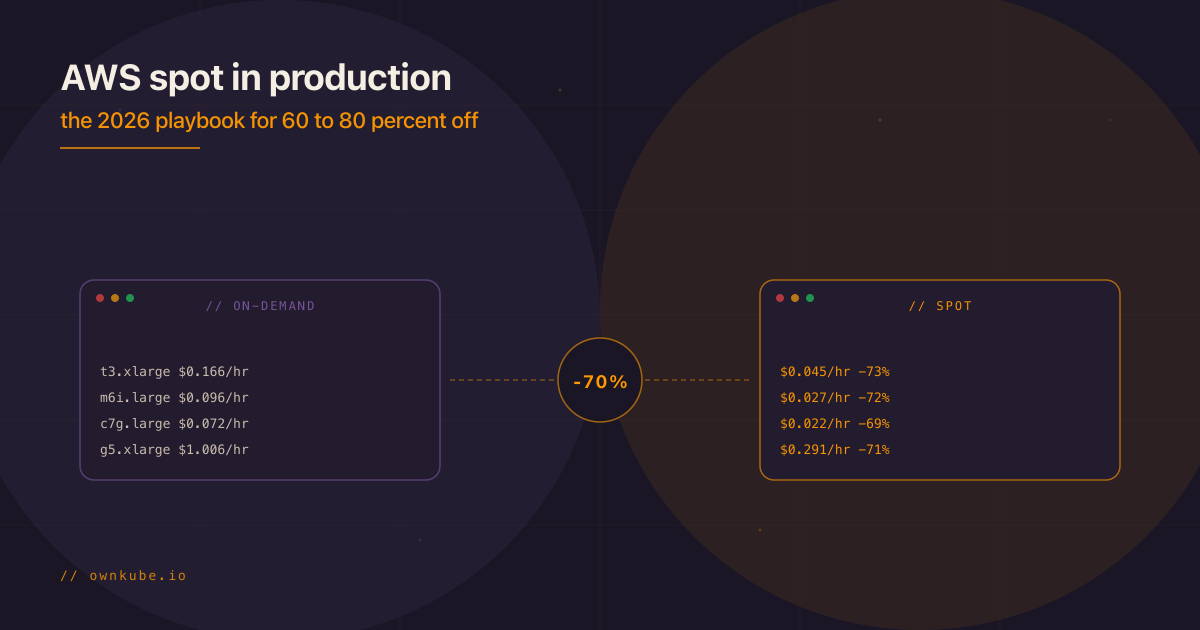
Real numbers from us-east-1 in April 2026 (approximate, varies by hour):
| Instance | On-demand $/hr | Spot $/hr | Savings |
|---|---|---|---|
| t3.xlarge | $0.166 | $0.045 | 73% |
| m6i.large | $0.096 | $0.027 | 72% |
| c7g.large | $0.072 | $0.022 | 69% |
| r6i.large | $0.126 | $0.034 | 73% |
| g5.xlarge (GPU) | $1.006 | $0.291 | 71% |
The spot discount is real. The question is operational: what workload can tolerate a 2-minute eviction notice without breaking a customer experience?
What’s safe on spot
Workloads that handle interruption gracefully:
- Stateless web pods behind a load balancer. The load balancer drains an evicted pod; another pod on a different node takes over. As long as you have more than one replica and the cluster has on-demand fallback capacity, the customer sees nothing.
- Queue consumers. A worker that’s halfway through a message either finishes (2 minutes is usually enough) or the message returns to the queue and another worker picks it up. Design for idempotency, which you should be doing anyway.
- Build runners. Github Actions self-hosted runners, GitLab runners. If a build dies, retry. The cost saving on a busy CI fleet is significant.
- Batch jobs and cron. Same logic. Idempotent batch jobs survive interruption. Non-idempotent jobs need to be made idempotent before going on spot.
- Preview environments. Per-PR environments are by definition transient. Spot is perfect for them.
- ML training and inference at large scale. Most training frameworks support checkpointing; modern inference is multi-replica behind a load balancer.
What’s unsafe on spot
These should stay on on-demand or reserved capacity:
- Database primaries. Postgres, MySQL, MongoDB, Redis. A 2-minute notice is not enough to safely fail over a database. Use spot for read replicas, not the primary.
- Stateful services with no replication. Single-replica workloads of any kind.
- Kubernetes control plane nodes. If you’re running k3s on EC2 (instead of managed EKS), keep the control-plane node on on-demand.
- Anything with a hard latency SLA. The reclaim event introduces a brief disruption. If your SLA is “99.99% under 50ms p99”, spot adds variance you can’t afford.
- Workloads with long stateful operations. A video transcoder mid-job, a long-running data migration, anything that loses progress when interrupted.
The patterns that make spot safe
Three patterns turn a “spot is too scary” team into a “we run mostly on spot” team:
Pattern 1: Mixed instance pools with on-demand fallback
Configure your autoscaling group or Karpenter (on EKS) with a base of on-demand capacity plus spot for the rest. The on-demand base absorbs spot reclaim events while replacement spot capacity provisions.
A typical small-startup ratio: 25% on-demand, 75% spot. For a 8-vCPU production fleet, that’s 2 vCPU of on-demand always there, with 6 vCPU of cheaper spot capacity layered on top. If spot is reclaimed, the workload continues on the on-demand base while new spot capacity comes online (typically under 5 minutes).
Pattern 2: Diversified instance families and AZs
Spot reclaim events are usually scoped to a specific instance family in a specific AZ. If your pool is “any of m6i.large, m6a.large, c6i.large, c6a.large across 3 AZs”, a reclaim event on one type rarely takes the whole pool down.
Both eksctl and karpenter make this trivial. Configure 4 to 6 instance types in the same broad family (general-purpose, compute-optimized, memory-optimized) and let the scheduler pick.
Pattern 3: Pod disruption budgets and graceful shutdowns
In Kubernetes, set PodDisruptionBudgets so the cluster knows the minimum-available count for each workload. When a spot node is reclaimed, Kubernetes drains pods according to those budgets, giving each container a terminationGracePeriodSeconds window to finish what it’s doing.
For most web pods, 30 seconds is enough. For queue consumers processing a single message, 90 to 120 seconds is closer to right. The spot notice is 2 minutes, so design termination grace to fit inside it.
A worked example
Take a typical 2026 SaaS: 1 web service (3 replicas), 2 background workers (2 replicas each), 5 preview environments, build runners, RDS Postgres (Multi-AZ) and ElastiCache (managed AWS, untouched by this exercise).
| Workload | Replicas | Spot strategy | Approx. monthly EC2 savings |
|---|---|---|---|
| Web pods | 3 | 1 on-demand, 2 spot | $120 |
| Worker pods | 4 | All spot | $200 |
| Preview envs | 5 | All spot | $180 |
| Build runners | variable | All spot | $80 |
| Control plane (k3s) | 1 | On-demand | $0 (baseline) |
Total: roughly $580 per month saved on a base compute bill of ~$800. About 70% off on a workload that’s already pretty modest.
For a Series A SaaS pushing 50+ vCPU of production traffic, the saving compounds into mid-five figures annually.
When NOT to bother
Be honest with yourself.
- Very small workloads (1 to 2 small instances, under $100/month total) don’t move the needle. The engineering time to configure spot exceeds the saving.
- Pre-product-market-fit teams should not optimize compute cost. Ship features. Optimize when growth makes the bill visible.
- Workloads governed by deeply regulated SLAs (financial trading, real-time medical) shouldn’t introduce spot variance.
How the platform layer handles this
A point worth making: spot configuration is the kind of work nobody on a 5- to 20-person team gets around to doing well. The instance-family diversification, the on-demand fallback, the pod disruption budgets, they sit on someone’s “next quarter” list for years.
If you’d rather not own that list, Ownkube runs the same workloads inside your own AWS account, with builds, deploys, TLS, and horizontal autoscaling handled by the platform, plus logs and metrics on every deploy so you can see what’s actually happening. The spot decisions above are still yours to make; the platform just gives you a shorter path to acting on them.
You don’t have to build the deploy pipeline and observability yourself. That part’s the default.
Decision checklist
Before flipping a workload to spot:
- Does the workload have more than one replica behind a load balancer or queue?
- Is the workload idempotent (or made idempotent) so an interruption doesn’t corrupt state?
- Have you configured
terminationGracePeriodSeconds(or equivalent) inside the 2-minute spot notice window? - Do you have an on-demand fallback layer that absorbs reclaim events?
- Is your monitoring set up to alert on actual customer impact (not just “node went away”)?
Five yeses, go to spot. Any no, fix that first.
Closing
Spot is one of the highest-leverage cost moves on AWS in 2026, and it’s massively underused by small teams. The pattern is well-understood: mixed pools, instance diversification, graceful shutdowns, and an on-demand base. With those four in place, 60 to 80% off compute is a real saving, not a paper exercise.
Related reading
- Kubernetes cost optimization for startups
- AWS NAT gateway cost: why it’s high and the fix
- EKS vs k3s on AWS: cost and when to choose
If you’d rather build on a platform that ships builds, deploys, TLS, and autoscaling as defaults instead of separate projects, Ownkube runs the same workloads inside your own AWS account. Starter is free forever on one instance; Production is $5 per vCPU plus $1 per GiB RAM per month once you scale. Deploy your first app.

// written by
Abhishek Jaiswal · Founder and EngineerAbhishek Jaiswal is the founder and engineer behind Ownkube, a cloud for personal software. He builds the platform and writes here about cloud cost, migrations, and running production infrastructure in your own AWS account without a DevOps team.