Render is a good platform. A lot of teams ship their first production app on it and never have a complaint. But if you’re reading a post called “Render vs AWS,” you’re probably not one of those teams anymore. You’ve hit something: a bill that stopped making sense, a security review that asked where the data lives, a networking requirement Render doesn’t cover. Now you’re trying to figure out whether to stay or move.
This post is the buyer-decision angle: a side-by-side comparison, the team sizes where each side wins, and the honest cost of owning AWS yourself. If you’re already past the comparison and just want the architecture for a Heroku-style platform on AWS, see A Heroku alternative that runs in your own AWS account. If your real question is “how do I do AWS without hiring a DevOps engineer,” that’s a different post.
Short answer: if you’re pre-PMF or under five engineers, stay on Render. If you’re a B2B SaaS team with growing AWS credits, a real compliance surface, or workloads that keep bumping into platform limits, running in your own AWS account is almost certainly the better long-term answer. The middle ground is a Render-like workflow on AWS infrastructure you own. The rest of this post walks through how to know which side of the line you’re on.
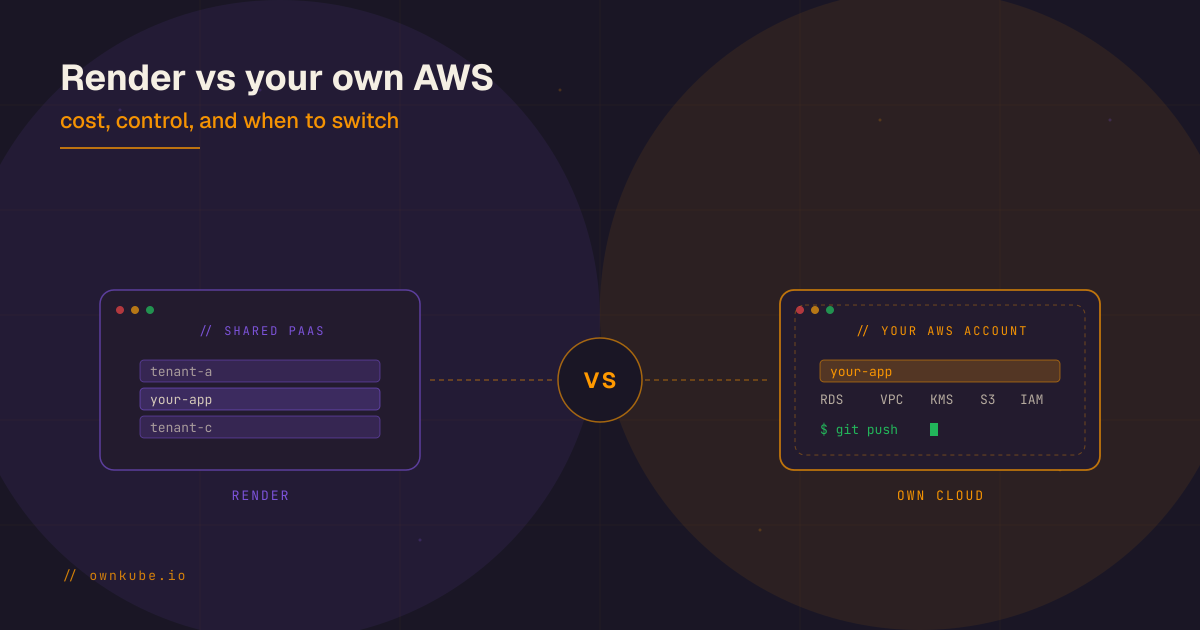
Render vs your own AWS account at a glance
| Dimension | Render | Your own AWS account |
|---|---|---|
| Setup speed | Minutes. Connect a repo, done. | Longer out of the box. Minutes with a platform layer on top. |
| Infrastructure control | Limited to what Render exposes. | Full access. Any AWS service, any region, any instance type. |
| Networking flexibility | Basic private networking, managed. | VPC peering, Transit Gateway, PrivateLink, Direct Connect, all available. |
| Security boundary ownership | Render’s shared infrastructure. | Your VPC, your KMS keys, your IAM, your audit logs. |
| Pricing predictability | Per-service pricing, markup over raw compute. | Wholesale AWS pricing. Credits apply. Savings Plans apply. |
| Operational burden | Render handles most of it. | You own it, unless you put a platform layer on top. |
| Migration difficulty | Low from zero. Higher later, because you’ve built to their primitives. | Higher upfront. Lower in perpetuity because the infra is yours. |
| Compliance story | ”Our PaaS provider is SOC 2." | "Our data runs in our VPC under our controls.” |
The table is honest. There are real reasons to stay on Render and real reasons to leave. The question is which set applies to you right now.
Why do teams choose Render in the first place?
It’s worth stating clearly, because Render does something well that AWS on its own doesn’t.
It’s fast. You connect a GitHub repo, pick a service type, and get a URL. No IAM roles, no VPCs, no load balancer to configure. For the first ninety days of a product, nothing AWS-native comes close to that velocity.
The defaults are good. TLS certs, zero-downtime deploys, health checks, autoscaling, a managed Postgres that actually works, all wired up without reading a single piece of documentation.
No infra team required. Two backend engineers can run a production business on Render without ever touching a cloud console. For seed-stage teams, that’s not a nice-to-have. It’s the difference between shipping and not shipping.
The developer experience is coherent. One dashboard, one mental model, one place logs and metrics show up. Engineers onboard in an afternoon.
If the above is everything you need, Render is a perfectly respectable home. Don’t let anyone talk you into a migration for the sake of sophistication.
When does Render stop fitting?
Nobody leaves Render because they stopped liking it. They leave because the shape of the business changed.
The bill stops being proportional. Render’s pricing is fine at small scale. But once you’re running a dozen services, a couple of background workers, and a Postgres with non-trivial storage, the per-service billing adds up faster than the equivalent EC2 + RDS would. On a growing app the delta can cover a senior hire.
Procurement asks harder questions. When an enterprise customer’s security team asks for a SOC 2 report, that’s easy. When they ask where customer data is processed, whether you control the encryption keys, and whether you can support a customer-specific region, “we use Render” starts generating follow-up emails.
You need networking Render doesn’t expose. VPC peering to a partner’s account. A PrivateLink endpoint to a vendor’s API. A customer-dedicated VPC. A specific region for data residency. These are table stakes on AWS and either unavailable or awkward on shared PaaS.
Your AWS credits are stranded. Most funded startups have six figures of AWS Activate credits. If the platform bill goes to Render, those credits are just sitting there, depreciating with the runway.
The lock-in gets heavier over time. Render services, Render disks, Render’s deploy model. The longer you build on them, the more expensive leaving becomes. Teams that start thinking about portability at month six are in a much better position than teams that start thinking about it at month thirty-six.
The workload outgrows the platform. GPUs, spot fleets, long-running batch jobs, specialized instance types, large private datasets. At some point you need a primitive Render doesn’t have, and the workaround is worse than just running it on AWS.
None of these are Render’s fault. Shared PaaS always makes the same tradeoff: simplicity now for flexibility later. You’re asking the question because the tradeoff stopped working.
What the full stack actually costs
The bill argument is easy to wave away until you price a whole app instead of a web service. A real app on Render is a web service plus a managed Postgres plus a cache, and Render bills each as its own line with a markup over raw compute. Take one small always-on stack, a 1 vCPU / 1 GiB web app, a 1 GiB / 10 GB Postgres, and a small cache, and compare three ways to run it:
| Monthly cost, small full stack | Render | Ownkube Compute | Your own AWS (k3s on EC2) |
|---|---|---|---|
| Web app (1 vCPU / 1 GiB, always on) | ~$25 | ~$12 | included in the instance |
| Managed Postgres (1 GiB / 10 GB) | ~$22 | ~$10 | included in the instance |
| Cache (small Redis or Valkey) | ~$10 | ~$5 | included in the instance |
| Underlying AWS instance | n/a | n/a | ~$30 (one t3.medium) |
| Total | ~$57 | ~$26 | ~$30 of AWS + a platform layer |
Read the numbers as illustrative, mapped to each provider’s nearest real tier as of October 2026. Two things stand out. Ownkube Compute runs the same stack for well under half the Render bill, because it meters the app per minute and runs Postgres and the cache on near-cost boxes (a database box from $4 a month plus storage, a Valkey cache box from $2) rather than marked-up add-ons. And once you own the AWS instance, the database and cache ride along on hardware you already pay for, so the marginal cost of adding them is close to zero. The crossover is real: a small managed stack is cheapest on Ownkube Compute, while a growing fleet of services and a large database eventually favors the instance you own outright. That is the whole arc of this post, and it is why Ownkube runs the same app on managed compute or in your own AWS account with no rewrite between them.
When running in your own AWS account makes sense
Be specific here, because “move to AWS” is advice that costs teams real money when it’s wrong. The honest answer depends heavily on team size, so we’ll break it down.
If you’re an indie builder or a 1 to 2 person team just trying things out, don’t migrate. Stay on Render, or if you really want AWS ownership, run k3s on a single EC2 box and call it done. You don’t have the headcount to absorb the operational surface of a full AWS setup, and Render’s simplicity is worth more to you than control right now.
If you’re a small team (up to 20 engineers) without a dedicated platform owner, running in your own AWS account is the right call if most of these are true:
- You’re selling B2B, and security questionnaires already mention AWS.
- You have AWS credits you actually want to use.
- You want the option to walk away from any vendor without rewriting deployments.
- The Render bill is approaching the cost of a senior engineer.
At this size, pick k3s on EC2 inside your own AWS account with a platform layer on top (on Ownkube, this is the BYOC Starter tier, free forever on one instance). You get the ownership story without the EKS complexity, and you can move to EKS later without replatforming your apps.
If you’re 20+ engineers with production traffic or real compliance pressure (SOC 2 Type II, HIPAA, ISO 27001, FedRAMP-adjacent work), pick a production-grade setup on AWS. Not as a hedge, as a commitment. At that size the managed control plane, IRSA, multi-AZ autoscaling, and full AWS observability pay for themselves. EKS becomes the default, not an upgrade (Ownkube’s BYOC Production tier, metered at $5 per vCPU plus $1 per GiB RAM per month).
If three or four of the bullets above apply to you, the sooner you start the migration, the cheaper it is.
The hidden tradeoff
“Just move to AWS” is not free advice. Raw AWS gives you everything and organizes none of it. You have to decide on a cluster or no cluster, a CI/CD approach, a secrets strategy, a logging pipeline, a cost monitoring setup, and a dozen other choices before the first deploy. Teams that go straight from Render to hand-rolled AWS often spend a quarter not shipping product while they wire it up.
This is where a lightweight platform layer on top of AWS earns its keep. The goal is to keep the Render-shaped developer experience (git push, managed database, a ready-to-share domain, observability baked in) while the infrastructure itself lives in your account.
Concretely, that usually means:
- A small Kubernetes distribution like k3s on EC2 for stateless workloads. Boots in seconds, runs on small instances, much smaller operational surface than EKS.
- State handled sensibly. For indie builders and small teams, a managed Postgres running in-cluster on your own EC2 (operated by an operator, not DIY) is a perfectly good default. As you grow into production scale, move to managed AWS services for stateful workloads: Multi-AZ managed Postgres, a Valkey cache, S3 for artifacts. The point is to not self-host what someone else already operates well.
- A deployment control plane that turns
git pushinto a running service without anyone writing a manifest. - A clear upgrade path. When the team grows and you do want EKS or a full platform team, the workloads don’t move. Only the control plane underneath them.
This is deliberately boring. The point is not to showcase infrastructure. The point is to keep the workflow your engineers already like, running on infrastructure you control.
When should you stay on Render?
To be fair (and because the wrong migration is worse than no migration) here’s when Render is still the right answer:
- You’re pre-PMF. Every hour spent on infrastructure is an hour not spent on the thing that might actually work.
- Your team is three or fewer. You don’t have the headcount to absorb even a well-abstracted AWS setup.
- Your workload is web-shaped and small. A couple of services, one database, no meaningful compliance surface.
- Your horizon is short. If the next six months are about customer discovery, not scaling, stay where you are.
- You don’t have AWS credits or a strong AWS preference. Going to AWS just to go to AWS is not a reason.
“Stay on Render” is a completely respectable answer. We tell indie devs and 1 to 2 person teams this all the time.
A decision checklist for switching
If you’re still on the fence, count how many of these apply to you:
- Our Render bill is larger than one senior engineer’s monthly comp.
- We have unused AWS credits we could apply.
- Customers are asking where their data runs or demanding their own region.
- We’re working on SOC 2, HIPAA, or a similar compliance framework.
- We’ve needed networking features Render doesn’t support (VPC peering, private links, specific regions).
- We expect to be on AWS in two years regardless, and would rather start now than migrate later.
- We want a real exit plan from our current platform vendor.
Three or more checked boxes means it’s probably time to start planning. Five or more means you’re already past the point where the move is cheap.
Reference: For the step-by-step version, see Migrate from Render in the docs.
Conclusion
Render is good at what it does. For early teams, it’s one of the fastest ways to get something real into production. But the same simplicity that makes it great at the start becomes a ceiling later: on cost, on control, on compliance, on what the architecture is allowed to look like.
For teams that hit that ceiling, running in their own AWS account is usually the right long-term answer. The honest catch is that raw AWS introduces its own overhead, and not every team has the time or headcount to absorb it. The middle ground is a managed, opinionated platform layer on top of AWS you own. That’s what most of these migrations actually look like. We walk through that architecture in detail in A Heroku alternative that runs in your own AWS account, and the EKS-vs-k3s call inside it in EKS vs k3s on AWS for startups.
If you want Heroku/Render-like deploys in your own AWS account, Ownkube is built for that. Connect your AWS account, get a git-push workflow, managed Postgres, a Cloudflare-backed domain, and automatic TLS and rollbacks, with the infrastructure, the data, and the exit in your name. Free forever on BYOC Starter, $5 per vCPU plus $1 per GiB RAM per month on BYOC Production when you scale. Fifteen minutes to your first deploy. Happy to talk through your situation if you’re not sure which side of the line you’re on.

// written by
Abhishek Jaiswal · Founder and EngineerAbhishek Jaiswal is the founder and engineer behind Ownkube, a cloud for personal software. He builds the platform and writes here about cloud cost, migrations, and running production infrastructure in your own AWS account without a DevOps team.